April 30, 2013
by bnf
Other articles by bnf
- ufo2otf Makes OTF’s, Webfonts and CSS From UFO’s
- November 5, 2013 9:57 PM
- Programmatically manipulating typefaces
- May 2, 2012 1:43 PM
- Downloading funghi, from Wikimedia Commons
- February 3, 2012 6:36 PM
- Absolute Beginners: Unix for Art Students – Part 2
- December 2, 2011 2:16 AM
- Vector pixels
- November 25, 2011 5:14 PM
bnf’s comments
- Dear Ned, thanks for your reaction, and the link to … read more
- As a programmer, what I find more worrying is that … read more
- Welcome read more
- Comparatively, the offer of WYSIWYG libraries is meagre. Luckily, the … read more
- Good call. So I should add a part to the … read more
- By the way, a related project (that might make ufo2otf … read more
- Never mind, I have found a solution more easy still. … read more
- In PHP, it would be something like this:<?php header("Content-type: text/css"); … read more
- With PHP, there still exists some link between the urls … read more
- hh read more
Other writers
- glit
- jenseits
- habitus
- tellyou
- baseline
- bnf
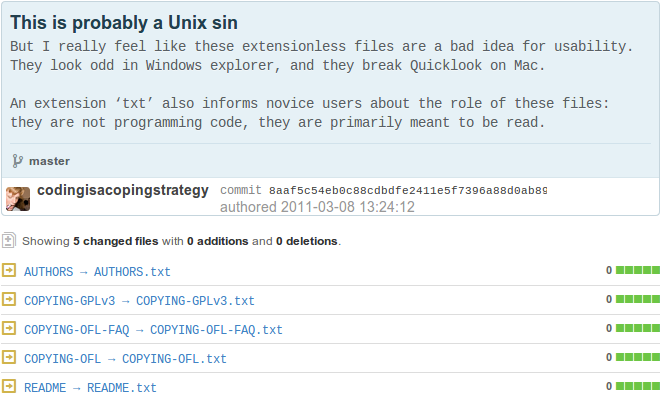
I remember first starting to download open source software in the 1990ies. It is better than the usual shareware: no annyoing pop ups and countdowns. There is all these files though: COPYING AUTHORS INSTALL. What do I do with them? Luckily there is a file called README, which makes me think of the README.txt files that Explorer proposes me to open with Notepad. It turns out I can open README as well with a text editor:
I wonder: who are these people in Boston? Why do they ask me to write them letters in the day and age where I download their software from the internet? And why didn’t they add
.txtto the end of their filenames?Reply
Well, at least you managed to download software that also included a runnable program. In my first encounters with open source software I would literally come across source files: computer code that still needs to be compiled (and I had no clue how that worked).
There’s open and there’s open: you might offer the source code to a program for free, but that does not mean the knowledge contained therein is accessible, unless a user is prepared to learn a lot about the culture of how programmers do things.
Reply
This also the problem with README.md. Markdown is a format for writing html codes in a typewriter plain text style, adored within the culture of programmers. Popular code hosting site Github renders README.md for you. But when you download a software package including such a file, it breaks in much the same way as an extensionless README does: A novice user does not know with which program to open it, and the Operating System is not able to give a preview.
Reply
Maybe they can start to recognise README.md.txt?
Reply
Try installing QLStephen: https://github.com/whomwah/qlstephen (Put it in ~/Library/QuickLook, then run qlmanage -r to reset quicklookd.) It makes this work.
by Rich - April 30, 2013 8:43 PM
Reply
There has been a standardized MIME type system that has fixed this issue for thousands of years^W^W^W decades.
'text/plain' would be the format here. Or for markdown, 'text/markdown'. Then applications would check the MIME type and one would open in a text editor and the other would open in some fanciful markdown editor (or whatever you had set for that MIME type).
It worked flawlessly in BeOS back in the '90s. The problem is with all these ridiculously outdated operating systems (only the visuals ever seem to be updated).
Don't even get me started on the state of local search vs the metadata system of BeOS' filesystem---lightning fast and you could save searches as folders that you could open and would be updated in real-time as new files that match the criteria are added.
by BeOS Fan #1 - August 6, 2013 4:27 PM
Reply